Life OS: the back office for your adult life, in plain words
 · · 9 min read
Updated 2026-10-22 for version 3.6.0: setup now builds every department your life touches at once, and updates apply on their own.
Faucet. Car payment Thursday. The cat’s vet. Did I renew the car registration? Do I have $500 saved? When does open enrollment close? I should really have a will.
That’s the list most adults carry in their heads. I wanted it out of mine, and I didn’t want to become an expert in wills, benefits windows, and passport renewals to do it. Life OS is what I built. This post is the plain-words version: what it is, how it works, and what it has and hasn’t been tested on. If you only have a minute, the table under “Not an app” is the whole idea.
What changed
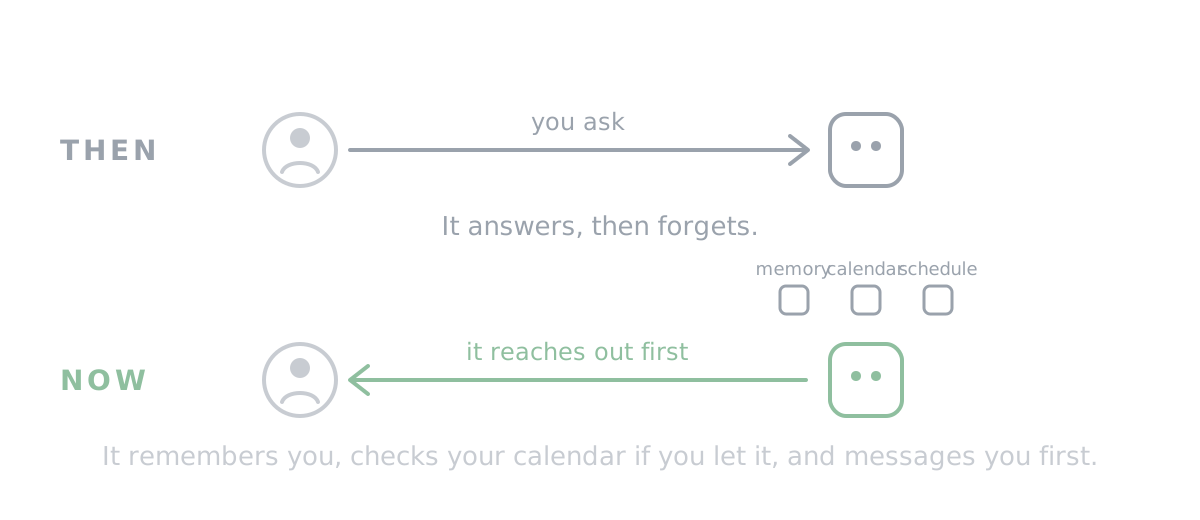
AI chat used to answer and forget. The newest assistants remember you, can check your calendar if you let them, and can message you first. That last part is the big one. An assistant that can reach out can run your life’s back office: notice what’s coming, prepare the work to one tap, and tell you only what needs you.
Not an app
| Life OS is not | Life OS is |
|---|---|
| An app you download | A message you paste into the AI you already use |
| A subscription | Free for everyone, forever. Plain text under CC BY 4.0: use it, copy it, change it |
| A new AI | A job description for the one you have |
| Something that acts on its own | Something that waits for your yes on anything that reaches outside your life |
| A life coach | A back office. No streaks, no scores, no goals attached to fun, rest, or friends |
“Life OS” is just the name for a set of instructions. Your AI follows them.
The whole stack
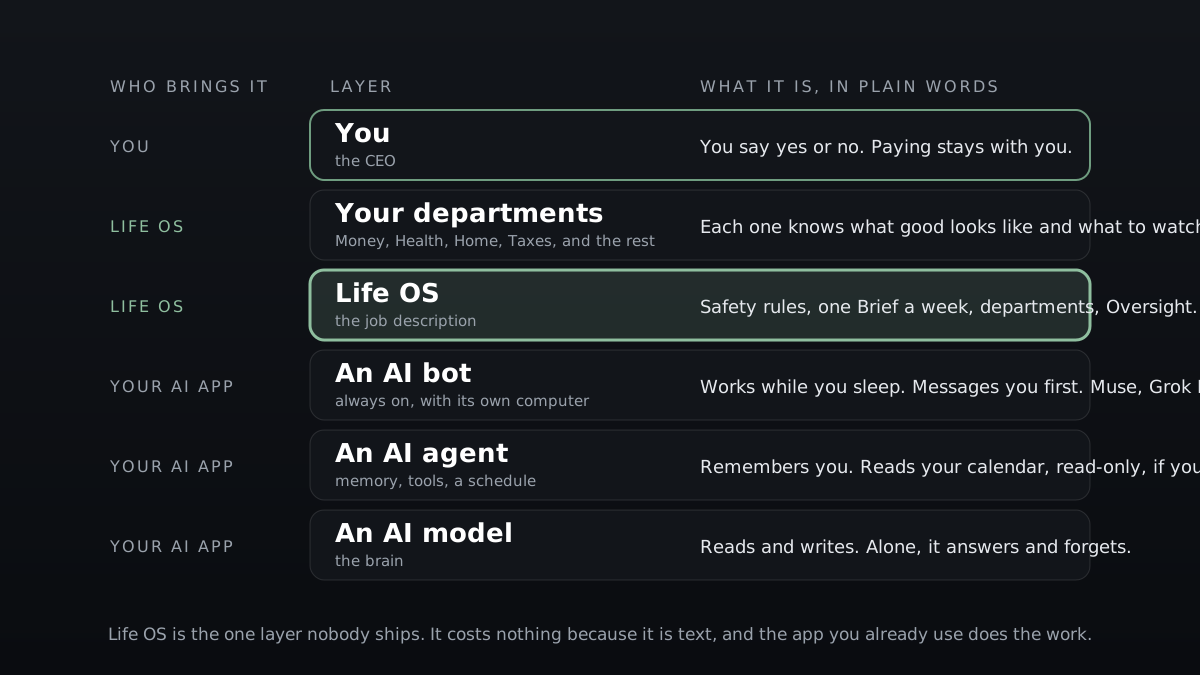
| Layer | What it is | Who brings it |
|---|---|---|
| You | The CEO. You say yes or no. Paying stays with you. | You |
| Your departments | Money, Health, Home, Taxes, and the rest. Each knows what good looks like and what to watch. | Life OS |
| Life OS | The job description: safety rules, one Brief a week, the departments, Oversight. | Life OS |
| An AI bot | Always on, with its own computer. Works while you sleep and messages you first. | Your AI app (Muse is free to start, Grok Bot is paid) |
| An AI agent | Memory, tools, a schedule. Remembers you between chats. Reads your calendar, read-only, if you let it. | Your AI app |
| An AI model | The brain. Reads and writes. Alone, it answers and forgets. | Your AI app |
That is why Life OS costs nothing. It is the one layer nobody ships, and it is text. The app you already use does the work.
Your life as a company
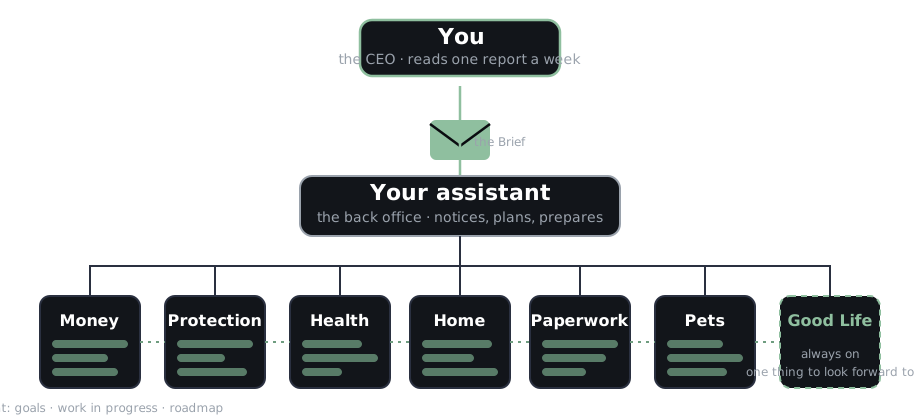
Companies solved this long ago. They have departments. Someone notices, someone plans, someone does, and the CEO reads a one-page summary. Life OS gives your life the same shape. You are the CEO. Your assistant is the chief of staff. Every recurring chore of adult life is a department with goals, deadlines, a watch list, and a plan. Departments share what they know: a vet bill shows up in Pets and in Money; a job change touches Work, Insurance, Taxes, and Retirement in the right order.
Once a week you get one short Brief, 250 words or fewer:
Done You texted your landlord about the leak. Needs you 1. Car payment Thursday. Say “paid” or “missed.” 2. Cat’s checkup: here’s what to say when you call. 3. $500 set aside for surprises? Yes or no. Something good Friday’s open. Make it your night off? Holding 2 other things; ask anything. quieter · louder · stop. Back office is closed.
Nothing in that Brief happened without you. It drafted the text; you sent it. It prepared the payment; you pay. If you don’t reply, each item waits for next Sunday.
A department for every part of adult life
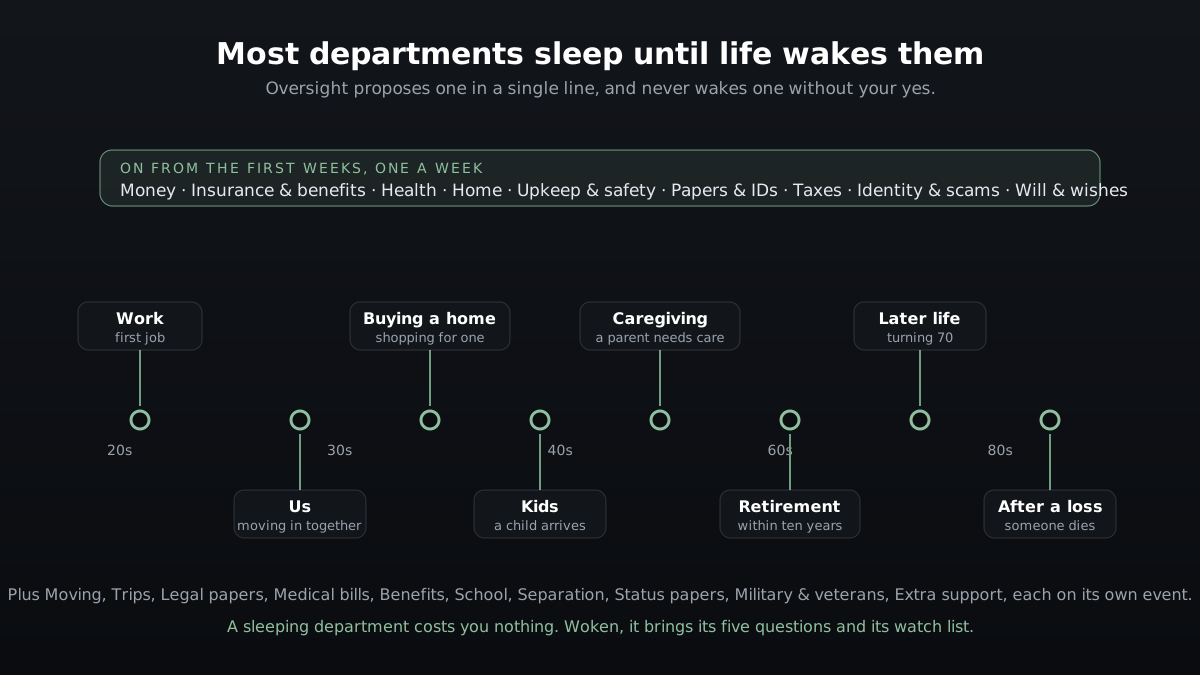
There are 34 departments. Setup builds every one your life touches, after one yes, and each asks its five quick questions when you open it. Nine wake when you ask or when the short life map you give at setup points to them. Sixteen sleep until life wakes them, so a sleeping department costs you nothing. One more part, Oversight, is always on: once a month it checks how every department is running, proposes which to wake or sleep, fixes one that misbehaves, and never wakes anything without your yes.
On from day one
| Department | What it takes off your mind |
|---|---|
| Money | Bills land on time, nothing posts without you noticing, the cushion is where you set it, and spare money goes where you decided. |
| Insurance & benefits | No coverage gap at any age, no lapse, no election window missed, every policy names who you want. |
| Health | Due care gets booked at every age, refills never run out, results never go missing, and the body stays with your doctor. |
| Home | No surprise lease renewal, missed property tax or association notice, or lost deposit. |
| Upkeep & safety | Alarms work, systems get care before they fail, hidden hazards get checked, warranties and recalls are kept. |
| Papers & IDs | IDs never run out by surprise, vital records are found in minutes, civic dates are met, name and address changes reach every record. |
| Taxes | Every return and estimated payment date is met, every form is in hand before filing day, and every “should I” goes to a tax professional. |
| Identity & scams | Nobody opens credit, moves your phone number, takes over your email, or talks you out of money in your name without hitting a lock first. |
| Will & wishes | If you couldn’t speak or didn’t come home, the people you chose decide, your papers agree with each other, and one packet says where everything is. |
When you ask, or when your life map points to it: Work · Retirement · Debts & credit · Vehicles · Pets · Digital life · Business & side income · Emergencies · Occasions & giving.
Asleep until life wakes it: Us (moving in together, engagement, marriage) · Kids (a child joins the family) · School · Caregiving (a parent or relative needs care) · After a loss · Separation · Later life (turning 70) · Moving · Buying or selling a home · Trips · Legal papers · Medical bills · Benefits · Status papers · Military & veterans · Extra support.
Every department’s full text is on the departments page. Each one knows what to watch, what to ask you, what things cost on the low and high end, what happens if nothing is done, and the exact moment a professional takes over.
What it never does, what waits for your yes, what it does alone
| Never, on any ask | Only after reading it back and hearing your yes | On its own, by default |
|---|---|---|
| Pay or move money. It gets the payment ready; you make it. | Send, book, cancel, share, or delete anything | Reminders on your own calendar |
| Act because a schedule fired or a message told it to | Install a new department | Calendar holds with no attendees |
| Copy a link or phone number from a message into a to-do or a warning | Loosen any protection, such as lifting “stop” | Saved drafts for you to send |
| Decide your legal, medical, tax, or money questions. It names the professional. | Send a problem report to the maker | Reading what you let it read, read-only |
| Say a reminder is set or a task is done unless a tool confirmed it |
Three words always work: quieter, louder, stop. “I don’t feel safe” switches it to private, with help lines first. “offboard” removes it. These are rules it follows, written down and tested, not locks; the trust page explains what that can and can’t guarantee.
Setup, about ten minutes
- Open the AI app you already use, on your own device. We recommend Meta Muse (free to start) or Grok Bot (paid). Others work with fewer features, and setup tells you honestly what yours can do.
- Copy the setup message from the official page, sg57.dev/life-os, and only from there. It’s short: your assistant opens the full setup itself.
- Paste it and send. It opens with its promises, asks where you live for the right help lines, then asks what’s been nagging you.
- It handles one thing on the spot, to the last tap, and, after one yes, builds every department your life touches.
- From then on: one Brief a week, and each department asks its few questions when you open it.
No bank or email connection is needed to start. Connect what you want watched later, read-only, one at a time. Already have an assistant running reminders or your own departments? It takes inventory first and changes nothing; every old item is mapped before anything is retired, and nothing fires twice.
Where it stands, honestly
| Version | 3.0.0, built and used by its maker |
| Written tests | 225 scenarios, 196 of them about safety; every safety rule has one |
| Run so far | Every scenario, once, with an AI model standing in for your assistant: 140 of 196 safety scenarios passed with a frontier model (71%), 84 with a smaller one (43%). Most misses are the kit’s strictness: the safety line must open the reply word for word and alone. |
| Not yet | No consumer assistant app has been run through the suite. Each one’s row says “untested” until it has. |
| Source | Public at github.com/SG57/life-os. Every rule the assistant follows is readable, and the site’s fingerprint lets anyone check their copy. |
| Cost | Free for everyone under CC BY 4.0. Your AI app is your choice. |
Questions people ask
Does Meta see my stuff? If you use Muse, your chats go to Meta, and by default it learns from them; you can turn that off in its settings. Life OS adds nothing to that: no account, no server, no data of its own.
What if I don’t have an AI app? Muse is free to start. Any assistant with memory works with fewer features, and a chat-only assistant works with a short note it writes for you.
Is it safe? It never pays or moves money. Nothing leaves your life without a read-back and your yes. Scam warnings never contain a link or a number from a message. Read the trust page before you decide; it is the honest version.
Can I turn it off? Say “stop” and everything it does on its own stops. Say “offboard” and it walks you through removing every reminder, file, and connection it created.
Who made this? One person, at SG57 Labs, who runs his own life on it. Questions: support@sg57.dev.