Running 8 AI Coding Agents in Parallel: A Practical Workflow Guide
 · · 7 min read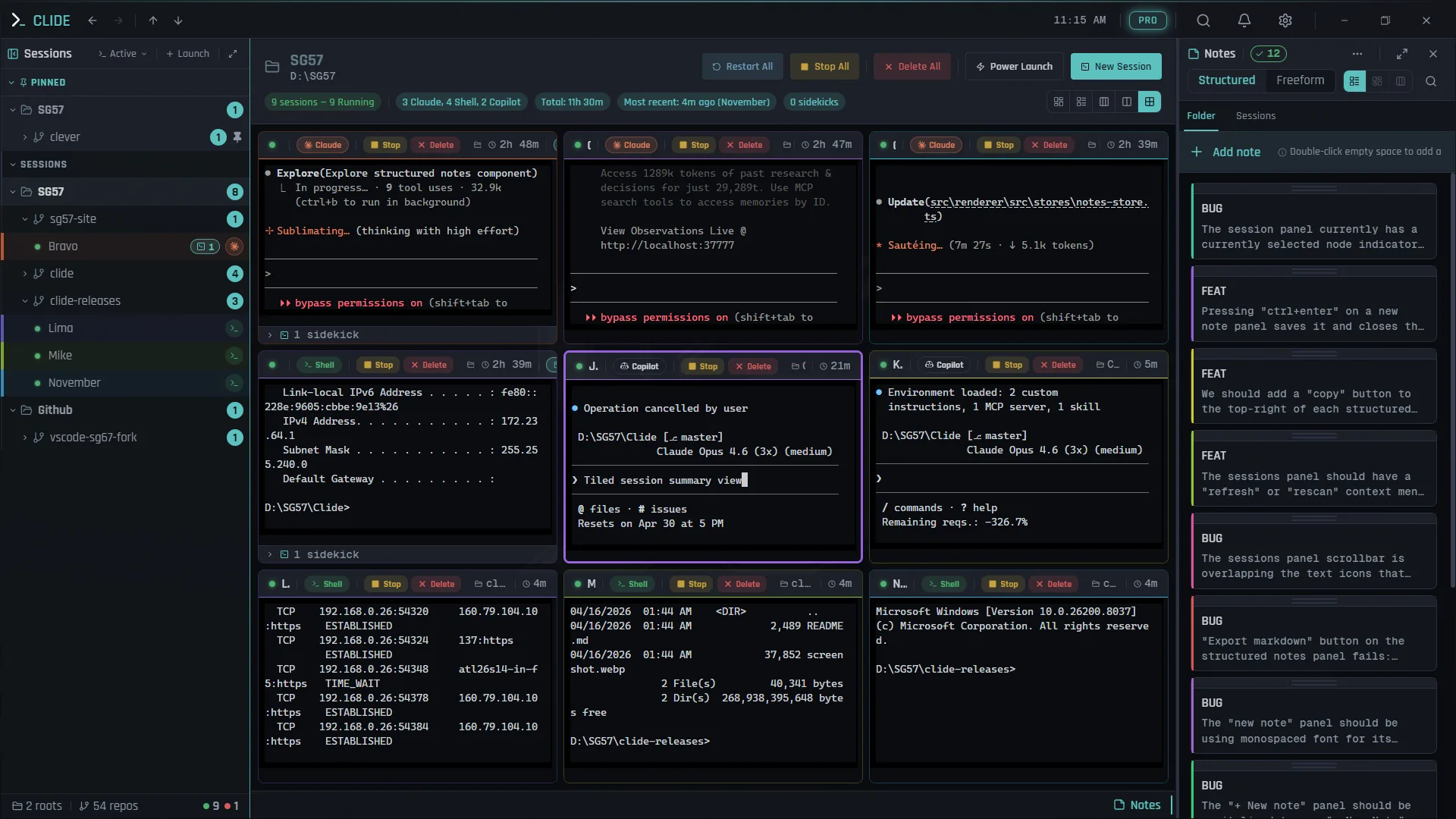
Why Parallel Agents Work
The mental model most developers have for AI coding agents is: one agent, one task, wait for it to finish, do the next thing. That model works. But it completely misses the structural opportunity.
AI coding agents are fast but asynchronous. They work quickly, but they also wait — for your confirmation, for their context to refill, for the next task assignment. In a single-agent workflow, your throughput is gated by their speed. In a multi-agent workflow, your throughput is gated by your speed — specifically, how fast you can review output and assign the next task.
That’s a different bottleneck. And it’s one you can actually optimize.
If you’re running 8 agents, and each agent is Active for 3 minutes then Idle for 30 seconds waiting for task direction, then even with some overhead you’re running close to 8x the throughput of a single agent. Your job shifts from “wait for the agent to finish” to “keep the agents fed with good tasks and review their output intelligently.”
This guide is how to do that.
Setting Up Your Fleet
Name Your Sessions With Intent
Random session names make fleet management chaotic. Use Clide’s NATO alphabet naming and assign each agent a role, not just a sequence number.
Good fleet assignments for a feature sprint:
| Session | Role | Working Directory |
|---|---|---|
| Alpha | Core feature implementation | /src/features/auth |
| Bravo | Unit tests for Alpha’s output | /src/features/auth |
| Charlie | UI components | /src/components |
| Delta | API routes | /src/api |
| Echo | Integration tests | /tests |
| Foxtrot | Documentation updates | /docs |
| Golf | Database migrations | /db/migrations |
| Hotel | Code review & cleanup | /src |
You don’t need 8 agents for every session. Start with 3–4 for a focused sprint. Scale up when you have enough parallel work to justify it.
Define Clear Boundaries
The biggest failure mode in parallel agent work is agents working on the same files simultaneously. This creates conflicts and unpredictable behavior. Define file ownership before you start:
- Alpha owns the auth module files. Bravo can read them (for writing tests) but shouldn’t be writing them simultaneously.
- Charlie owns the component directory. Delta doesn’t touch it.
- Golf owns the migrations directory exclusively.
This isn’t perfect — sometimes agents legitimately need to touch shared files — but being intentional about it upfront prevents most of the “agent A undid agent B’s work” problems.
Work Distribution Strategies
One Agent Per Feature
The cleanest model: each agent owns one discrete feature or module end-to-end. Alpha writes the auth service. Bravo writes the user profile service. They shouldn’t need each other’s files mid-sprint.
Best for: feature work that genuinely parallelizes at the module level.
Feature + Test Pair
For every implementation agent, spin a dedicated test agent:
- Alpha implements → Bravo writes tests for Alpha’s output (after Alpha’s Done)
- Charlie implements → Delta writes tests for Charlie’s output
You sequence these in soft waves: implementation agents first, test agents follow. Bravo stays Idle while Alpha is Active, then activates when Alpha flips to Done.
Best for: teams who care about test coverage and want tests written in the same sprint as the implementation.
Divide by Layer
Agents divided by application layer:
- Data layer agent — models, migrations, database queries
- Business logic agent — service classes, validation, business rules
- API layer agent — route handlers, middleware, serialization
- UI layer agent — components, hooks, styles
- Test agent — cross-layer test coverage
Best for: vertically-sliced work where multiple layers need updating for the same feature.
The Review Cadence
The most important thing you can do to maximize fleet throughput is establish a review cadence and stick to it.
Every 5 minutes: glance at Fleet Panel. Check states. Respond to any Blocked sessions immediately. Review any Done sessions (read the output, make a decision — accept it, request revision, assign next task).
Every 5 seconds: don’t. Constantly clicking into sessions breaks your focus, which is more expensive than the delay from a slower check-in cycle.
The asymmetry here is important: agents can be Blocked and waiting without consequence. But you switching focus every 30 seconds has real cognitive cost. Let Concierge’s toast notifications handle the “something needs your attention now” signal. Do your own proactive reviews on a 5-minute cadence.
Your Actual Role During a Sprint
When the fleet is running, your job is:
- Review Done sessions — read the output, decide if it meets the requirement, merge or request changes
- Unblock Blocked sessions — respond to prompts and questions, give clear direction
- Feed Idle sessions — assign the next task immediately when a session goes Idle
- Monitor Active sessions briefly — spot-check that agents aren’t drifting off-course
That’s it. The agents do the writing. You do the judgment work.
Common Failure Modes
Agents Blocking Each Other on Shared Files
Symptom: Agent A edited file X. Agent B also edited file X. You have conflicting changes to reconcile.
Fix: Define file ownership more carefully at sprint start. Use separate branches per agent for large feature work. Reconcile conflicts during review, not after the fact.
Context Creep
Symptom: An agent starts a task, generates a large amount of output, and its subsequent work quality degrades. It starts forgetting earlier decisions or contradicting them.
Fix: Keep task scope per-session small and well-defined. When an agent approaches context limits (Concierge will notify you), close the session and spawn a fresh one with a clean, specific prompt. Don’t try to run a 4-hour task in one context window.
Prompt Drift
Symptom: An agent’s output starts diverging from what you actually wanted. It’s technically doing something, but not the right thing.
Fix: Clear, specific prompts from the start. “Write unit tests for the AuthService class in /src/services/auth.ts — focus on login(), logout(), and refreshToken() methods, use Jest, mock all external calls” is a good prompt. “Write some tests” is not.
When you notice drift, don’t try to course-correct with additional prompts. Close the session, review what it generated, and restart with a better-specified task.
Review Debt
Symptom: You have 5 Done sessions and you haven’t reviewed any of them. You don’t know what was actually written.
Fix: Review cadence. Review before assigning new tasks. Don’t let Done sessions pile up unreviewed — you’ll lose track of what was done and start building on unreviewed code, which compounds mistakes.
Solo Agent vs Fleet: Throughput Comparison
| Workflow | Sessions | Typical Sprint Output | Review overhead |
|---|---|---|---|
| Solo agent | 1 | 1 feature module per hour | Low |
| Small fleet | 3–4 | 3–4 modules per hour | Medium |
| Full fleet | 6–8 | 5–7 modules per hour (with review bottleneck) | High |
The throughput curve is not linear — review becomes the bottleneck before raw agent count does. A 12-agent fleet mostly just means more Done sessions sitting unreviewed. The sweet spot for most senior engineers is 4–6 agents — enough parallelism to be meaningfully faster than solo, not so much that review becomes chaotic.
Clide’s Role in This
Running a fleet without visibility into session state is just running chaos in multiple terminals. Clide’s Fleet Panel gives you the status view you need — which sessions are Active, Blocked, Idle, or Done — without tab-switching. Concierge notifies you the moment an agent is blocked so you respond in seconds, not minutes. Collections let you spawn your standard fleet configuration with a single command so you’re not rebuilding your terminal setup every sprint.
This isn’t about tool dependency. You can run 8 Claude Code sessions in Windows Terminal. You can also write code in Notepad. The question is whether you want to spend cognitive budget on managing your terminals or on managing your agents’ output.
Download Clide at sg57.dev/clide — free, Windows. Built for exactly this workflow.