How Text Easy Learns to Write Like You (Without Reading Your Messages)
 · · 6 min read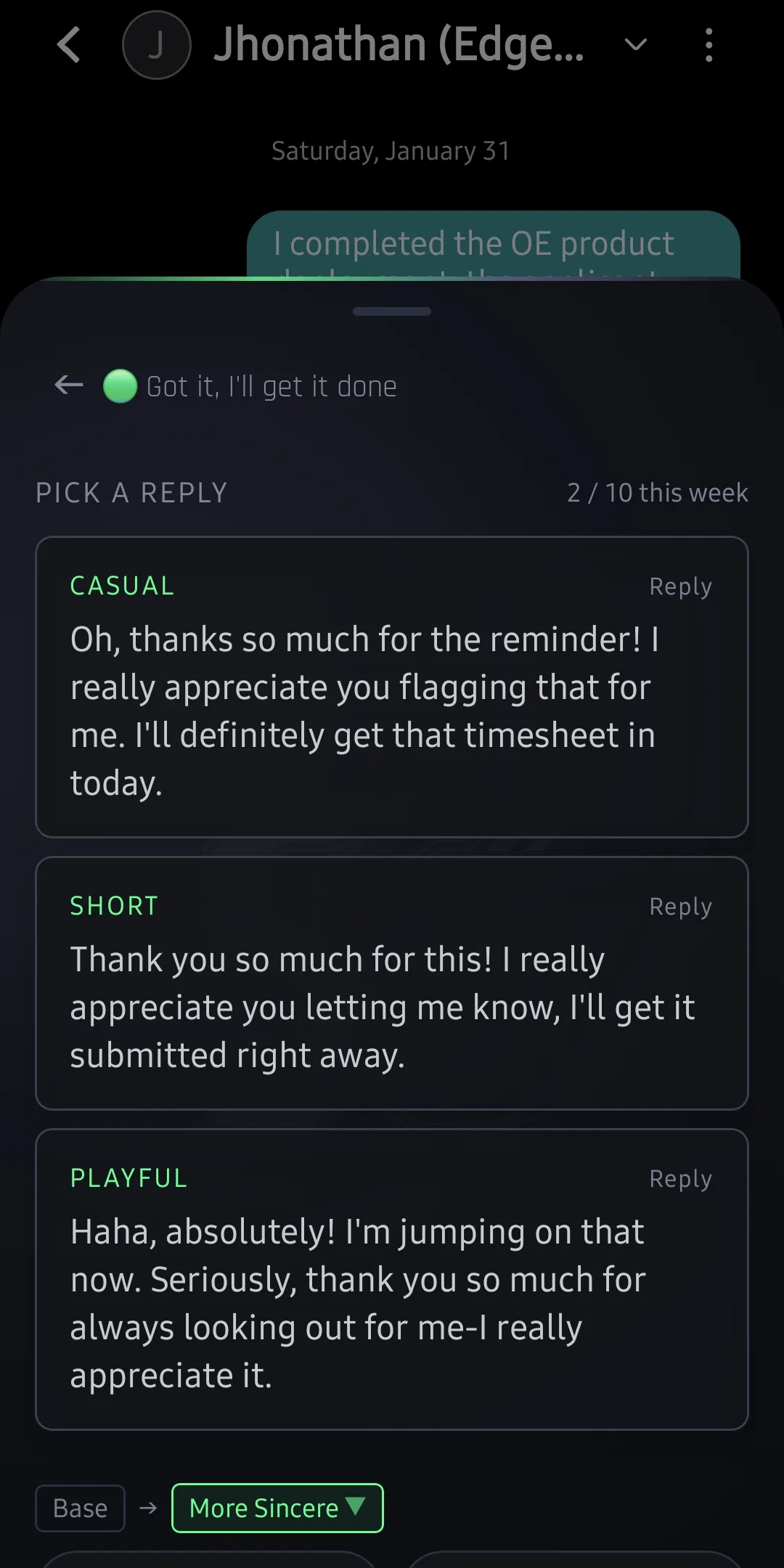
The Voice Problem With AI Replies
Every AI reply tool has the same failure mode: the generated text sounds like an AI wrote it. It’s polished. It’s grammatically perfect. It uses phrases like “I hope this message finds you well” and “please don’t hesitate to reach out.” Nobody talks like that. Nobody you know, anyway.
The core issue is that generic AI reply tools have no context for who you are. They know the message they’re responding to, but they don’t know your style, your relationship to the sender, or how you actually communicate. So they default to formal, safe, pleasant — the linguistic equivalent of a stock photo.
Text Easy takes a different approach. Rather than generating a single “correct” reply, it asks you to define the intent and voice, then generates options that fit your communication style — not a generic baseline.
How Voice Matching Works (The Non-Technical Version)
Voice matching in Text Easy isn’t trained on your message history. It doesn’t read your SMS thread or learn from your past replies. Instead, it works through explicit configuration — you tell it how you communicate, and it applies that to every generated reply.
Here’s what Text Easy uses to match your voice:
1. Voice Modes
You select a primary voice mode that applies globally:
| Voice Mode | What It Produces |
|---|---|
| Casual | Conversational, contractions, informal phrasing |
| Formal | Complete sentences, professional register, no slang |
| Brief | Short, to the point, no filler |
| Warm | Friendly tone, slightly more expressive |
| Blended | Casual warmth — informal but thoughtful |
You can override this per-message if a specific conversation calls for a different register.
2. Intent Selection
Before generating a reply, you tell Text Easy what you’re trying to communicate. This is the biggest driver of quality:
| Intent | What It Does |
|---|---|
| Agree & confirm | Affirmative reply, optionally confirms details |
| Decline | Politely declines, offers alternative if relevant |
| Reschedule | Declines current time, proposes a new one |
| Ask for more info | Turns the reply into a clarifying question |
| Acknowledge | ”Got it” — low-friction acknowledgment |
| Enthusiastic yes | Agree with energy |
| Offer options | Generates reply suggesting 2–3 alternatives |
| Buy time | ”I’ll get back to you” — buys response time gracefully |
Intent is the signal that prevents the AI from guessing what you want to say. Without it, you get a generic reply that might be technically responsive but misses your actual goal.
3. Refinement Loops
The first generated reply won’t always be exactly right. Refinement lets you steer it:
- “Make it shorter” — trims to essentials
- “More casual” — relaxes the register
- “More formal” — tightens it up
- “Add a question” — turns the reply into a two-way exchange
- “Warmer” — adds more personal energy
- “More direct” — removes softening language
Refinements are iterative. You can chain them. You can apply three in a row until the reply sounds exactly right. Each refinement preserves what was good about the previous version and adjusts the specific dimension you targeted.
Real-World Voice Examples
Here’s the same incoming message processed through different voice configurations. The message:
“Hi! Are you free for a call Thursday around 2pm to go over the project brief?”
Casual + Agree
“Yeah, Thursday at 2 works for me! Talk then.”
Formal + Agree
“Thursday at 2pm works for me. I’ll add it to my calendar — looking forward to discussing the brief.”
Brief + Agree
“2pm Thursday works. Talk then.”
Warm + Ask for More Info
“2pm on Thursday sounds good in theory! Is this a quick check-in or more of a deep dive? Just want to come prepared.”
Casual + Decline + Reschedule
“Thursday 2pm doesn’t work for me — how about Friday afternoon, or Monday morning?”
None of those are bad. They’re just different. The right one depends on who you’re talking to and the relationship you have. Text Easy lets you select that context rather than guessing.
Why This Is Better Than Copy-Pasting From ChatGPT
Let’s be honest — a lot of people already use ChatGPT for this. The flow is: copy the message, open ChatGPT, type a prompt, copy the reply, paste it back. That works. But:
- It’s 6 context switches for one reply. Text Easy is 2 taps.
- ChatGPT doesn’t know your voice. You’d need to give it a style brief every time.
- Your message goes to OpenAI via the web UI, which has different privacy implications than the API (browsing history, potential training use on free tier).
- There’s no intent structure. You write a freeform prompt and hope it guesses what you want.
- Refinement is manual. You write another prompt instead of tapping a modifier.
Text Easy isn’t smarter than ChatGPT. It’s just built specifically for this use case — structured intent, voice context, and fast iteration already built into the UI.
The “Without Reading Your Messages” Part
A reasonable question: how does Text Easy match your voice if it never reads your messages?
The answer is: it doesn’t need to. Linguistic style can be approximated with a small number of parameters — formality level, sentence length preference, use of contractions, emotional register. Text Easy captures these through your voice mode selection and refines them through your refinement history.
This is a deliberate design choice. Training on your message history would require:
- Read access to your existing SMS conversations
- Storage or processing of that data
- A privacy trust question that most users shouldn’t have to think about
Explicit configuration sidesteps all of that. You describe your style. Text Easy applies it. No history required.
In BYOK mode, this means the only data that leaves your device is the incoming message and your style parameters — not a corpus of your past conversations. The privacy story stays clean.
The Quick-Select Panel
Beyond the main compose flow, the Quick-Select panel is worth calling out separately. It pre-generates replies for your most common message types — confirmations, declines, “on my way,” “running late,” acknowledgments — in your configured voice, before you even ask.
When you get a message and you already know what you want to say, the Quick-Select panel means you’re tapping a ready reply instead of triggering a generate cycle. For high-volume reply situations, this is the fastest path through your message queue.
Text Easy is free to download. Voice matching, intents, refinements, and the Quick-Select panel all work in both BYOK and Cloud Mode.
Download Text Easy at sg57.dev/text-easy — and stop sounding like a press release when you’re just trying to confirm a lunch.